Introduction
After the article about Email Security, I thought I would continue the trend of writing about “boring” and “unpopular” security assessments. While looking at various infrastructure-related components that are never discussed in popular “pentesting” courses, one topic immediately stood out: firewall configuration reviews.
These are often treated like a checkbox exercise: more like “let’s get it over with” than “let’s dive into it”. After spending some time fiddling with Cisco configurations and documentation, I have to admit that I now find them a bit less boring than I did before. That’s progress, isn’t?
Let’s dive straight in.
TL;DR on Firewalls
A firewall is simply a security device that controls traffic flowing between networks.
Firewalls are commonly used to implement network segmentation by dividing environments into security zones (e.g. Public and Internal networks). Traffic moving between these zones can then be controlled using various security controls, such as Access Control Lists (ACLs), Network Address Translation (NAT), and Virtual Private Networks (VPNs).
From a security perspective, a firewall serves three primary purposes:
- Enforcing network segmentation
- Restricting communication across trust boundaries
- Monitoring and auditing network activity
Now that we know what a firewall is, let’s see how we can audit one.
Audit Process
Overview
In practice, firewall reviews are often performed using configuration dumps. The client sends us one or more large configuration files (often 5-6k lines each) and we have to make sense of them. Therefore, our goal is not to analyse every single line individually, but rather identify and extract the information most relevant to security.
This article is split into eight “review areas” covering the most security-relevant components of a firewall configuration. While the examples focus on Cisco ASA/FTD configurations, the underlying concepts are vendor-agnostic, so you should have no problem applying them to other devices, such as Fortinet, Palo Alto, etc.
| # | Section | Security Question |
|---|---|---|
| 1 | Network Architecture | What assets and trust boundaries am I protecting? |
| 2 | Access Control | Who can communicate across those trust boundaries? |
| 3 | VPN Security | Which external users and networks can access the environment? |
| 4 | Administrator Authentication | Who can administer the firewall and how are they authenticated? |
| 5 | Control Plane Protection | Can untrusted systems communicate directly with the firewall? |
| 6 | Logging | Can security events and administrative actions be investigated? |
| 7 | Monitoring | Can potential issues be detected before they impact the environment? |
| 8 | NAT | Which internal services and networks are exposed externally? |
Network Architecture
A firewall audit is an assessment of how traffic is permitted to cross the specified trust boundaries. Before we can (effectively) assess anything, we first need to understand the environment we are trying to protect. This means identifying the network architecture and the trust boundaries between its different parts.
Let’s start with some definitions:
- A network is a collection of systems that share a common address space and can communicate with one another. Networks are typically organised according to their purpose, for example, different networks for corporate users, servers, and public-facing services.
- An interface is the point where a firewall connects to a network. Each interface represents a separate segment of the environment and acts as a gateway through which traffic enters or leaves the firewall.
A firewall sits between multiple networks and controls how traffic is permitted to flow between them; one interface may connect to the internet while another connects to a Corporate network.
The first step of a firewall audit is identifying the networks that make up the environment and the interfaces that connect them. Without this context, it is difficult to determine whether a firewall rule serves a legitimate purpose or simply introduces unnecessary risk.
In Cisco ASA/FTD configurations, interfaces have both a physical (e.g. Port-channel1.100) and a logical (e.g. INTERNET) name. The former identifies the actual interface, but the latter (usually) provides a more useful description of the network connected to it:
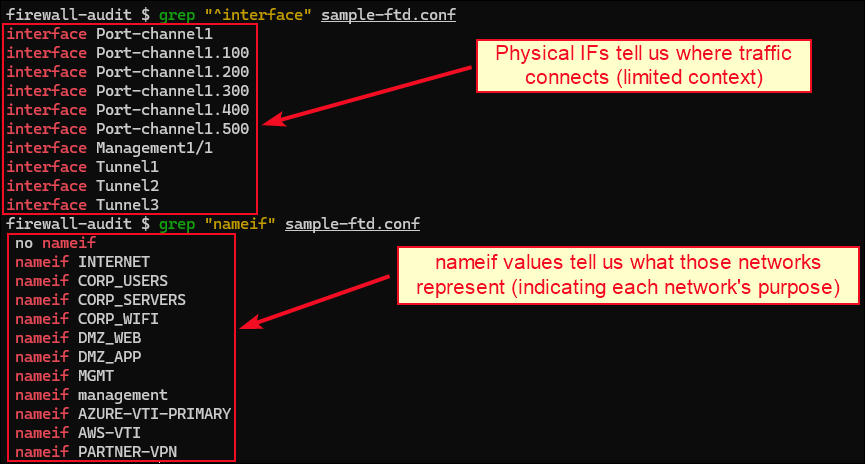
By simply reviewing the interface names, we can already build a high-level understanding of the environment. In this case, the network appears to be pretty-well segmented, with clearly defined areas for internet access, corporate systems, DMZ services, and management networks.
As environments grow, applying policies to and reviewing individual interfaces becomes increasingly difficult. To address this problem, interfaces are often grouped into security zones. Simply put, security zones are collections of networks with a similar trust level.
Rather than applying policies to every individual interface, firewalls can enforce controls between zones. The example below illustrates this higher-level segmentation:
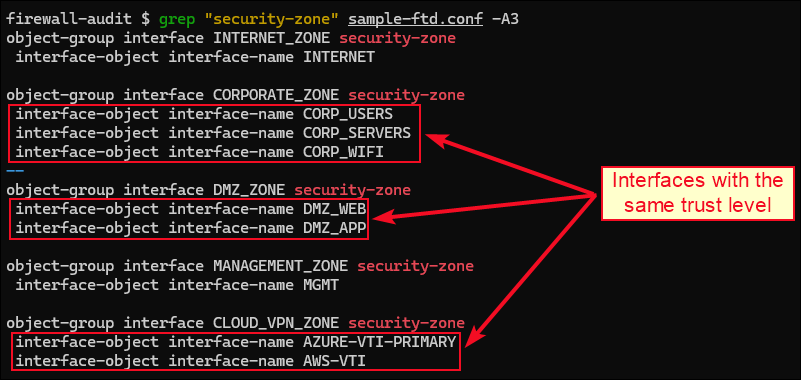
Trust boundaries exist whenever traffic moves between zones with different trust levels, for example, between CORPORATE and INTERNET. It is worth noting that trust boundaries are not explicitly defined in the configuration. We have to manually identify them by analysing how security zones relate to one another and where traffic is expected to move between networks.
In our sample configuration, we might have the following security zone to trust level mapping:
| Zone | Trust Level | Reason |
|---|---|---|
INTERNET_ZONE | Untrusted | Publicly exposed |
DMZ_ZONE | Semi-trusted | Links external and internal |
CORPORATE_ZONE | Trusted | Internal |
MANAGEMENT_ZONE | Highly trusted | Internal and restricted |
CLOUD_VPN_ZONE | External / Partner | Third-party, not under our control |
Based on the above table, we can infer several trust boundaries requiring review. This helps us understand where firewall controls are expected to enforce security policies. Interesting boundaries typically involve internet-facing networks, management networks, VPN-connected environments, etc.
In our example, the following trust boundaries could be of interest:
| Trust Boundary |
|---|
INTERNET_ZONE ↔ DMZ_ZONE |
CORPORATE_ZONE ↔ MANAGEMENT_ZONE |
CORPORATE_ZONE ↔ CLOUD_VPN_ZONE |
Remember that we are simply identifying areas that require further review; we are not claiming that traffic is permitted between these zones. We know nothing about that yet! For example, we might identify a trust boundary between the INTERNET_ZONE and the MANAGEMENT_ZONE, indicating a publicly exposed management-related interface.
Management interfaces are used by administrators to configure, monitor, and maintain the firewall using services hosted on the firewall device itself, such as SSH and HTTPS. These must be very well protected as unauthorised access could result in complete compromise of the firewall.
On the other hand, publicly exposed interfaces typically host or terminate public services, remote access/site-to-site VPNs, etc. These represent the highest-risk attack surface within the environment and they can often be identified through a combination of their logical names, public IP addressing, and their role in VPN termination:
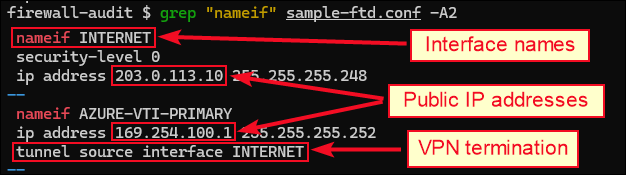
At this stage, we understand the environment well enough to identify the major trust boundaries, which systems are exposed to the internet, and how administrators manage the firewall.
We can now move from what the environment looks like to how communication is controlled within it and answer the next question: who can talk to whom?
Access Control
Once we understand the environment’s architecture, we can begin reviewing how traffic is permitted to flow within it.
The objective of this phase is determining which systems can communicate with one another and whether those communications align with the organisation’s security requirements. In Cisco firewalls, this is primarily achieved through Access Control Lists (ACLs).
An ACL is a collection of rules used to decide whether traffic should be allowed or denied. Because ACLs determine which systems can communicate across trust boundaries, they represent one of the most important areas to review of a firewall review.
For instance, an ACL rule that permits HTTPS traffic to the WEB-SERVER object looks like this:

An important consideration about ACLs is what is known as first-match processing. ACLs are evaluated from top to bottom, which makes rule order extremely important. When a packet matches a rule, processing stops and the associated action is applied.
For example, the rule order below causes traffic destined for 10.10.10.10:22 to be denied because the first matching rule is applied before the second rule is evaluated:

Large firewall deployments often contain thousands of systems, networks, and services. To simplify management, Cisco firewalls support network objects, service objects, and object groups.
Think of a network object as a named reference (e.g. WEB-SERVER) to an IP address or network (e.g. 172.16.10.100). Object groups extend this concept by allowing multiple objects to be grouped together and referenced through a single ACL entry:
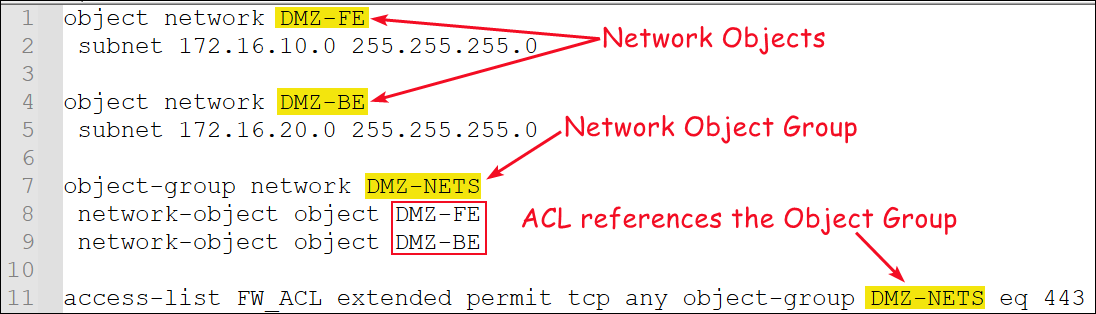
Because firewalls are designed with the principle of least privilege in mind, if traffic is not explicitly permitted, i.e. does not match any ACL entry, it will be denied by default. This is known as implicit deny and means that every ACL effectively ends with deny ip any any, even when that rule does not explicitly appear in the configuration.
When reviewing ACLs, one of the first things we look for is the presence of overly permissive rules, such as permit ip any any or permit tcp any any. These rules allow communication between extremely broad groups of systems and can significantly increase the environment’s attack surface.
In the example below, the first three ACL entries permit traffic between explicitly defined systems and services (e.g. HTTPS traffic to the WEB-SERVER). However, the fourth rule permits all remaining traffic, effectively negating the restrictions introduced by the preceding rules:

For example, a connection to the WEB-SERVER over SSH (TCP/22) would not match any of the first three rules. As the firewall continues evaluating the ACL from top to bottom, the traffic would eventually reach the permit ip any any entry and therefore be allowed. The final deny ip any any rule would never be reached.
We reached the point where we understand which systems are permitted to communicate across the identified trust boundaries and whether those permissions appear appropriately restricted.
We can now move beyond internal communications and ask: who can access the environment remotely?
VPN Security
Virtual Private Networks (VPNs) extend connectivity beyond the local environment and therefore represent some of the most important trust boundaries within a network.
From a security perspective, every VPN introduces a pathway into or out of the environment, whether that pathway belongs to a remote user, a cloud environment, a branch office, a business partner, or a third-party service provider.
Cisco ASA/FTD firewalls support two broad VPN categories:
- Remote Access VPNs allow individual users to securely connect to corporate resources from external locations.
- Site-to-Site VPNs connect networks together and are used to extend connectivity to external environments.
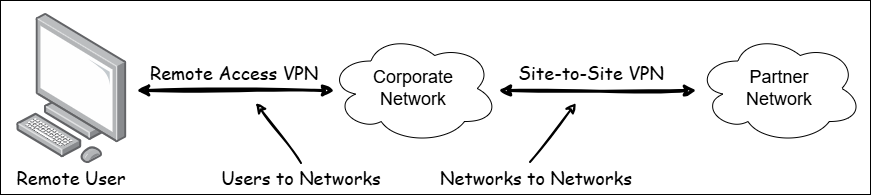
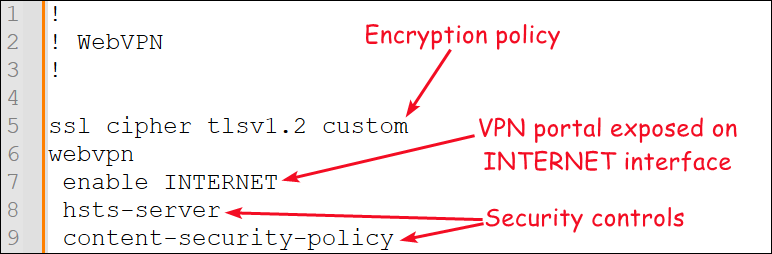
Remote Access VPNs often rely on dedicated VPN address pools and authentication mechanisms to provide users with remote connectivity. Cisco ASA/FTD firewalls also support Remote Access VPN connectivity through WebVPN, a feature that allows users to establish VPN sessions using a web browser or dedicated VPN client. WebVPNs often represent one of the most accessible entry points into the environment as they are commonly exposed to the Internet.
Site-to-Site VPNs are commonly implemented using Virtual Tunnel Interfaces (VTIs) and should be reviewed carefully, as every Site-to-Site VPN extends the organisation’s trust boundary beyond the local network.
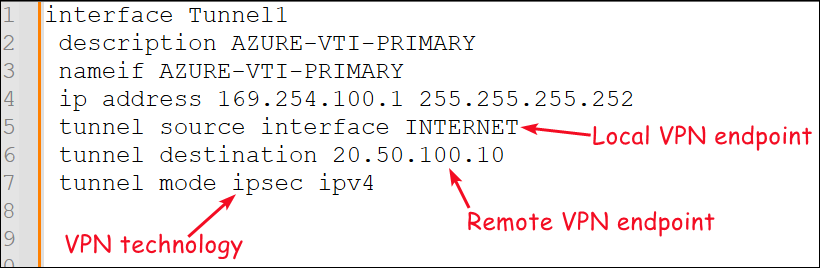
One useful piece of information we can extract from these definitions is the location where the VPN tunnel terminates. This is commonly referred to as VPN termination and can initially seem counterintuitive because the local VPN endpoint is defined using the source keyword.
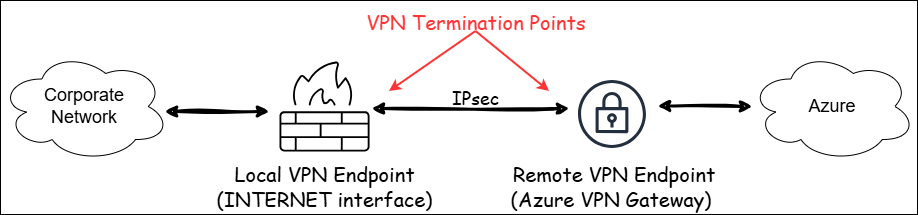
In layman’s terms, a VPN termination point is the place where the VPN tunnel is established and where traffic is encrypted before leaving and decrypted after arriving.
In the example below, the VPN tunnel is established between the firewall’s INTERNET interface and the remote Azure VPN Gateway. These two systems act as the local and remote VPN endpoints that form the IPsec tunnel. Traffic exchanged between the two networks is encrypted before entering the IPsec tunnel and decrypted when it reaches the opposite endpoint:
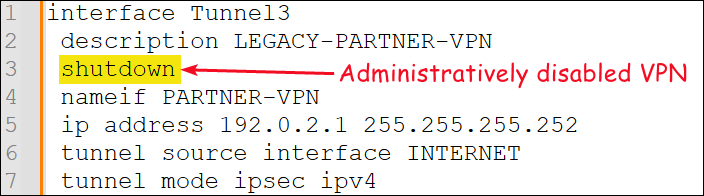
Not every VPN configuration is necessarily active. During reviews, it is common to encounter VPN definitions that have been administratively disabled but never removed.
While disabled VPNs generally do not introduce active connectivity risks because they cannot pass traffic, they often indicate legacy business relationships, incomplete migrations, or obsolete configuration. Their presence may also reveal previously trusted external connections that should be reviewed and removed where appropriate to reduce administrative overhead and configuration complexity.
Now that we understand which users, networks, and external organisations can access the environment remotely, we can shift gears and move onto the next question: who can administer the firewall?
Administrator Authentication
Firewalls sit at the centre of the network and often provide direct access to critical infrastructure. As a result, reviewing how administrators authenticate to the device is just as important as reviewing the firewall policies themselves.
Cisco ASA/FTD firewalls support several mechanisms for handling Authentication, Authorisation, and Accounting (AAA). These technologies are designed to reduce reliance on local administrator accounts by centralising AAA decisions.
For the Active Directory people, this is conceptually similar to how Kerberos centralises authentication through Domain Controllers rather than requiring every system to maintain its own local user database.
- Terminal Access Controller Access Control System (TACACS+) is one of the most common authentication protocols used for Cisco device administration. AAA decisions are delegated to dedicated TACACS+ servers.
- Remote Authentication Dial-In User Service (RADIUS) provides a similar centralised authentication model and is commonly used for network device administration, VPN authentication, and wireless access control.
- Security Assertion Markup Language (SAML) integrates the firewall with external identity providers (e.g. Entra ID or Okta). Rather than authenticating directly against the firewall, administrators are redirected to a trusted identity provider, enabling features such as Single Sign-On (SSO) and Multi-Factor Authentication (MFA).
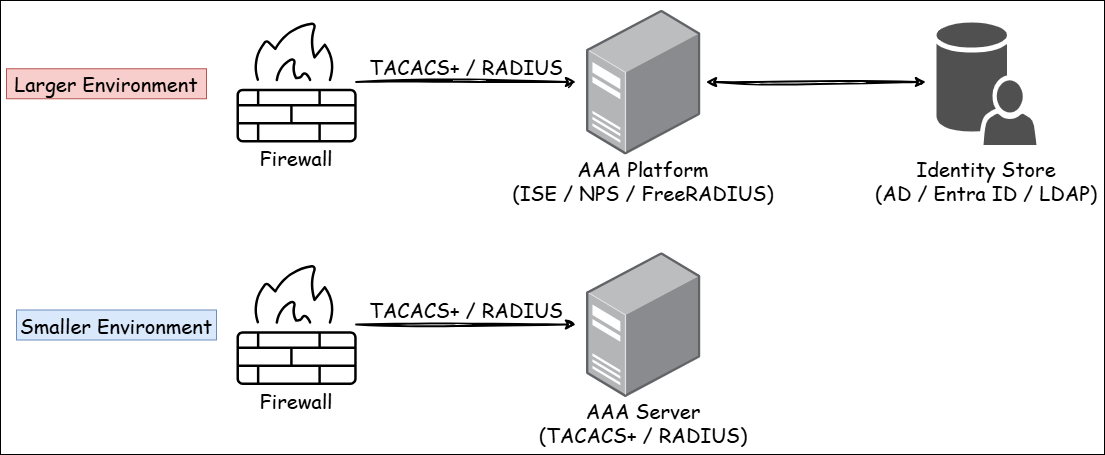
Small environments often authenticate directly against dedicated TACACS+ or RADIUS servers, while larger environments typically introduce AAA platforms such as Cisco Identity Services Engine (ISE), Microsoft Network Policy Server (NPS), or FreeRADIUS.
Rather than authenticating users locally, the firewall forwards authentication requests using TACACS+ or RADIUS to one of these platforms. The AAA platform then validates the user’s identity against a central identity source such as Active Directory, LDAP, or Entra ID before returning the appropriate authentication and authorisation decision.
This was a lot of information, so let’s quickly recap:
- TACACS+ and RADIUS are protocols that define how the firewall communicates with a centralised authentication system.
- TACACS+ and RADIUS servers, ISE, NPS, or FreeRADIUS are authentication systems that receive those requests and make the actual AAA decisions.
To drive the point home, let’s see an example configuration and its respective authentication flow:
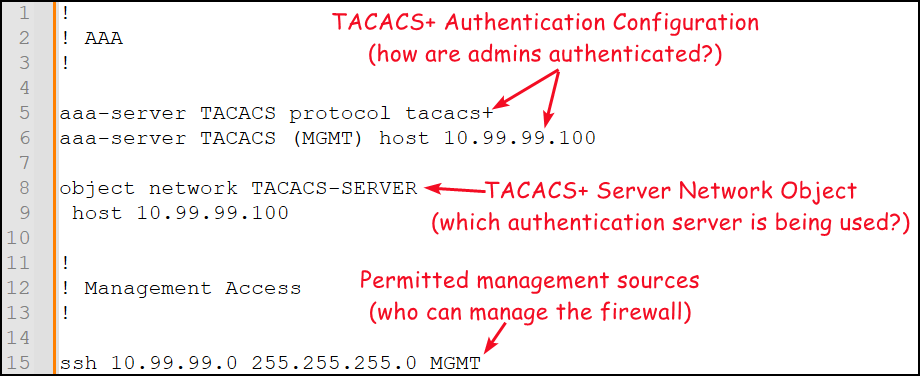
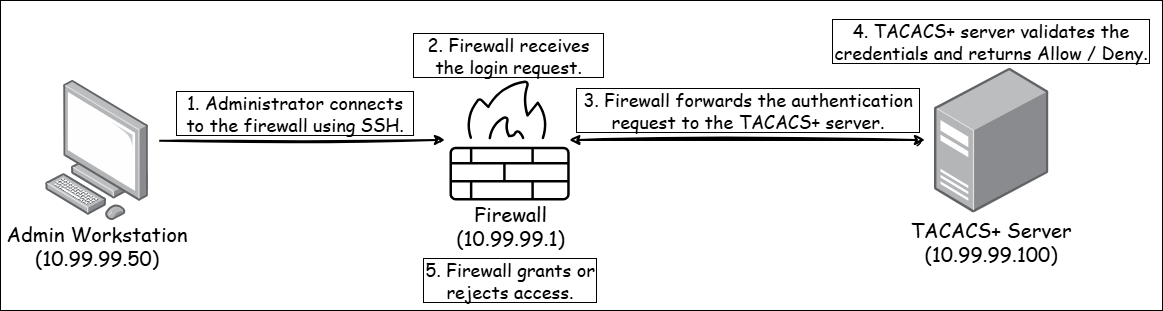
Regardless of the technology used, the goal remains the same: centralising authentication decisions and reducing reliance on local administrator accounts. We want to understand who can administer the firewall, how they authenticate, and where those authentication decisions are being made.
However, before any authentication can take place, a connection to the firewall must first be established. This brings us to the next question: who can communicate directly with the firewall itself?
Control Plane Protection
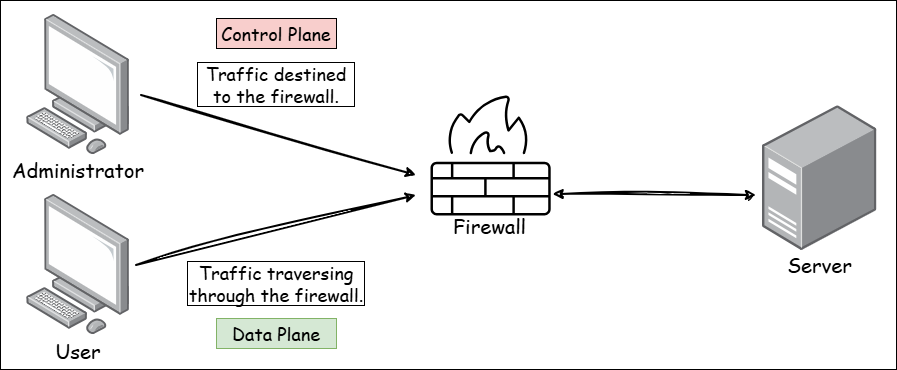
Up to this point we have focused primarily on traffic flowing through the firewall, but haven’t considered traffic destined to the firewall itself. This distinction is commonly described as the difference between the data plane and the control plane. Protecting the latter ensures that direct access is limited to authorised systems.
Services such as SSH, HTTPS, and SNMP are hosted directly on the device and therefore form part of its control plane. If these services are exposed to untrusted networks, an attacker may be able to target the firewall directly rather than attempting to traverse it.
One of the first things to review is which systems are permitted to access administrative services hosted on the firewall. In the configuration below, systems within the two defined networks are permitted to establish SSH sessions to the firewall’s MGMT interface:
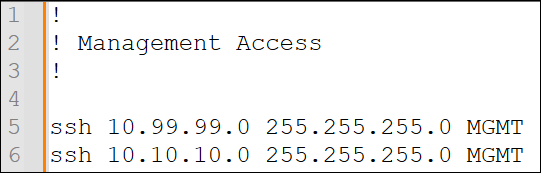
When reviewing these entries, we should verify that access is limited to legitimate management networks and not unnecessarily exposed to broader user populations.
Cisco firewalls can also apply ACLs to the control plane itself. In the example below, the CONTROL_PLANE_BLOCK ACL is first defined using the access-list keyword and then applied using the access-group keyword:
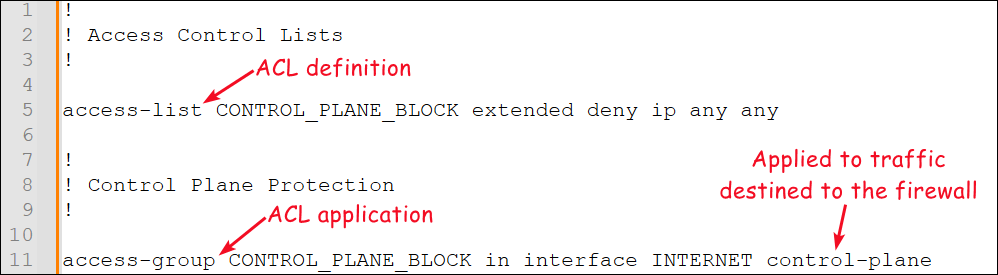
The control-plane option changes the scope of the ACL from traffic traversing the firewall to traffic destined to the firewall itself. As a result, the ACL only affects traffic targeting services hosted on the firewall; traffic traversing the firewall continues to be processed by the normal data-plane ACLs.
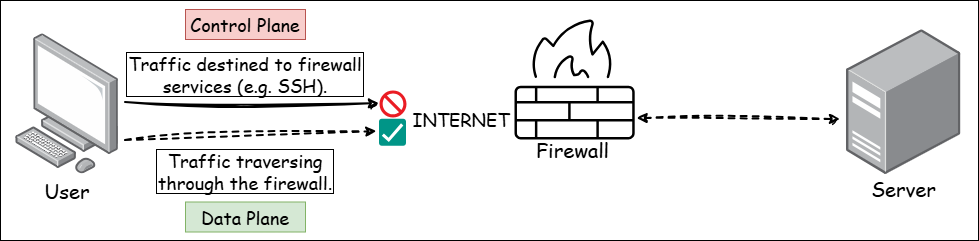
Management services should be reachable only from dedicated management networks and authorised systems. The goal is ensuring that even if an attacker can reach the network on which the firewall resides, they still cannot communicate directly with the firewall itself.
Up until now, we have focused on prevention: segmentation, ACLs, VPNs, authentication, and control plane protection. However, a secure configuration alone does not guarantee that everything will work as intended. That leaves us with the next question: how will we know if something goes wrong?
Logging
Logging provides visibility into firewall activity and creates an audit trail of security-relevant events. During an incident, firewall logs are often one of the primary sources of evidence used to understand what happened, which systems were involved, and whether suspicious activity occurred.
The objective of this phase is determining whether logging is enabled, where logs are being sent, which systems receive security events, and whether sufficient information is available for incident investigations.
Similar to the AAA section, the main goal here is centralisation. Rather than storing events locally on every network device and server, organisations typically forward logs to a dedicated logging platform such as a Syslog server or Security Information and Event Management (SIEM) solution. Depending on the configuration, firewalls can generate logs for a wide range of activities, such as ACL matches, administrative actions, and configuration changes.
The configuration below enables logging and forwards events to the specified Syslog server:
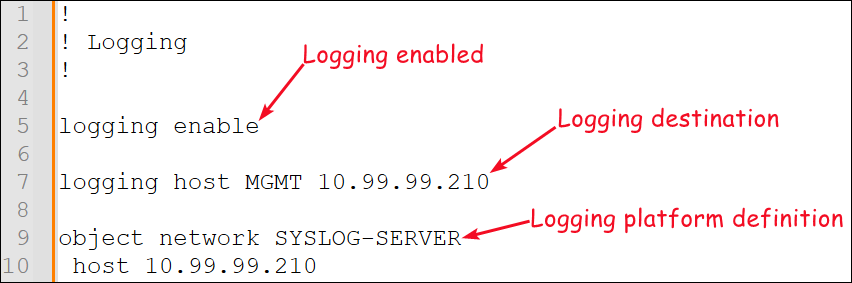
Visibility, however, is only one side of the equation. Collecting events is useful, but we also want to be proactive and identify issues before they become incidents. This leads us to the next question: how can we identify problems before they impact the environment?
Monitoring
While logging helps investigate events after they occur, monitoring helps identify issues as they happen. Effective monitoring allows administrators to track the health, performance, and availability of the firewall and receive alerts when abnormal conditions are detected.
From a security perspective, we are primarily interested in the latter: alerts when the firewall becomes unavailable, a VPN tunnel fails, or resource utilisation exceeds expected thresholds. The objective of this phase is determining whether the firewall is actively monitored, which monitoring systems receive alerts, and whether operational issues can be detected quickly.
Cisco ASA/FTD firewalls commonly use the Simple Network Management Protocol (SNMP) to integrate with monitoring platforms. In the example below, the monitoring server at 10.99.99.220 is permitted to collect information from the firewall using SNMP:
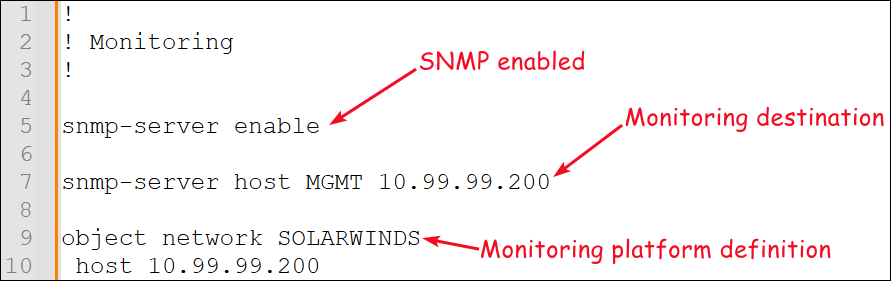
Monitoring is often centralised through dedicated platforms such as SolarWinds, PRTG, and Zabbix. Security teams may also integrate monitoring data alongside firewall logs to improve visibility and incident response. Ultimately, the goal is ensuring that issues affecting the firewall can be detected and addressed before they impact the wider environment.
We already know where traffic can enter and leave the environment. The final question is: which internal systems are actually being exposed through those paths?
Network Address Translation
Network Address Translation (NAT) modifies packet addresses as traffic traverses the firewall. Although NAT is not a security control by itself, reviewing NAT policies helps us understand how internal systems communicate with external networks and which services are exposed beyond the organisation’s trust boundaries.
Therefore, NAT reviews can help us identify which networks can access the internet, which internal systems are publicly accessible, how traffic moves across trust boundaries, and whether those flows align with the architecture identified earlier.
There are two common forms of NAT:
- Dynamic NAT (PAT) → many internal systems share a single public IP address.
- Static NAT → a fixed mapping between an internal and external address.
In modern environments, Dynamic NAT is commonly implemented as Port Address Translation (PAT), where multiple internal systems share a single public IP address and the firewall uses source port numbers to keep individual connections separate.
The below Dynamic NAT rule translates traffic originating from the CORPORATE network to the IP address assigned to the INTERNET interface. This type of NAT is commonly used to provide internet access for internal users and servers. The Static NAT rule translates traffic arriving at the public address associated with the INTERNET interface to the internal WEB-SERVER:
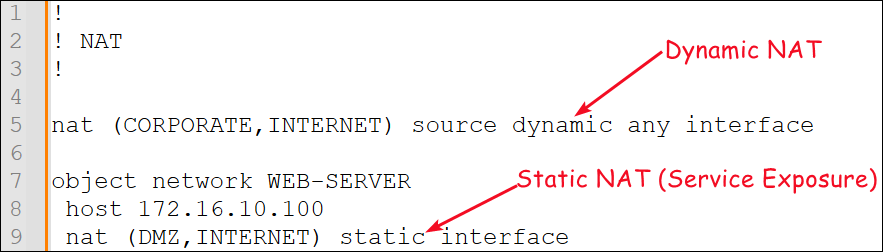
When reviewing static NAT rules, we should identify which systems are being exposed and whether that exposure is justified. A common misconception is that NAT alone controls access between networks.
In reality, NAT and ACLs perform different functions: NAT determines how traffic is translated, while ACLs determine whether that traffic is permitted. For example, a NAT rule that translates traffic from the CORPORATE network to the INTERNET interface does not automatically grant internet access. A corresponding ACL entry is still required to permit the communication.
For this reason, NAT policies should never be reviewed in isolation and must always be considered alongside the relevant ACLs.
Automating the Review with Firewall-Audit
Working through firewall configurations manually is one of the best ways to understand how networks are segmented and how security controls are enforced. Unfortunately, real-world firewall configurations often span thousands of lines across multiple files, making even basic enumeration a time-consuming task.
To speed up the repetitive parts of the process, I developed (vibe-coded with my friend Copilot once again) firewall-audit, a tool that automates the methodology described throughout this article. The goal was not to replace manual review, but to quickly extract the security-related information and provide a high-level overview of the environment before diving into the details.
In essence, it attempts to answer the same security questions we have been asking throughout this article. Its output is intentionally high-level (similar to email-audit) and follows the same structure on each section.
For instance, the ACL section starts with key metrics for the review area, highlights potential findings, and finishes with a reminder of why we are reviewing the area in the first place:
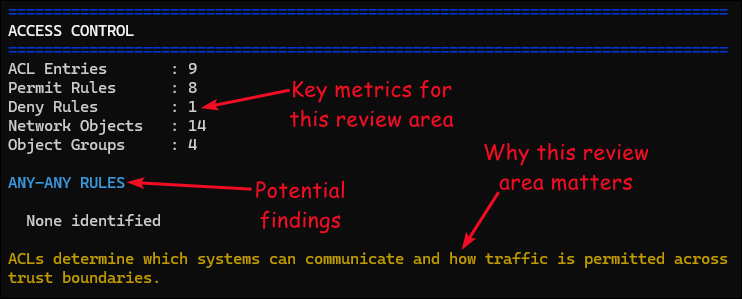
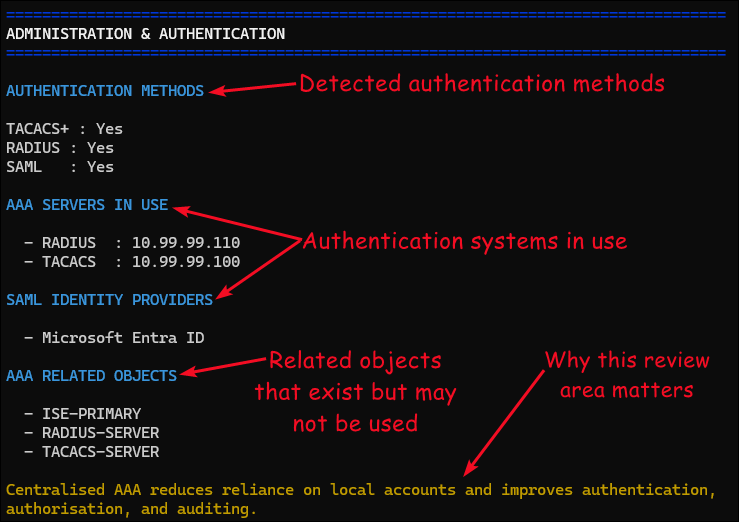
I also tried to make a clear distinction between what merely exists in the configuration and what is actually being used.
For example, the screenshot below contains an ISE-related object, but there is no evidence that the firewall is using it. In contrast, the RADIUS and TACACS+ servers are directly referenced by the configuration and therefore form part of the active authentication infrastructure:
The long-term plan is to introduce section-specific verbose modes (e.g. --net-arch, --acls, etc.) that provide a deeper view into each review area. Rather than displaying only a high-level summary, these modes will display the underlying configuration elements without requiring reviewers to manually work through the configuration files themselves.
Support for additional firewall vendors is also a part of the long-term plan.
No promises though!
Conclusion
Firewall configuration reviews are rarely considered the most exciting type of security assessment. However, they often provide some of the clearest insight into how an organisation actually enforces trust boundaries and controls communication between its most critical systems.
Hopefully, this article has helped demystify the process by breaking it down into a series of security-focused questions. By approaching a configuration systematically, it becomes possible to understand a firewall’s security posture without getting lost in thousands of lines of configuration.
The syntax may change, the vendor may change, and the technology may evolve, but the underlying security questions remain the same.