Introduction
This article is about pentesting, not red teaming. We are given a DA account to extract NTDS, we don’t need to be stealthy or anything of that sort. Therefore, OPSEC considerations out of scope.
I recently went from just testing (close-to-zero-functionality) web apps and APIs to doing more varied stuff, including internal assessments. An internal test consists of many different parts, one of which is assessing the passwords used within the domain (what we call a password audit).
This can be summed up as follows:
Extract NTDS → Clean/Organise NTDS → Crack hashes → Analyse results
The process sounds simple, and, for normal people, it really is. But I am not one of those people; one of my greatest joys in life is to overcomplicate the simple things. So, buckle up (or don’t, really)!
The goal of this article is to simply dip my toes one level deeper into what I encounter during the password audit process. Don’t expect a deep dive into Microsoft protocols, listing every possible NTDS extraction method, or doing fancy password attacks. We are here for the simple, boring, daily stuff!
I will (selfishly) try to break down this process into four parts with the goal of improving my life by understanding what I am doing a tiny bit better. Most courses demonstrate how to use hashcat or JtR to crack hashes, but even the most thorough ones, the likes of CPTS, PNPT, and CAPE, never touch on a topic like this.
So I thought, since I will spend some time “researching” this topic anyway, why not write a short article about it? So I did.
TL;DR on NTDS
As you probably know already, passwords are stored server-side in databases in a strange-looking format called a hash. In an Active Directory (AD) environment, this database is called NT Directory Services Directory Information Tree (NTDS.dit) and is located within the Key Distribution Centre (KDC).
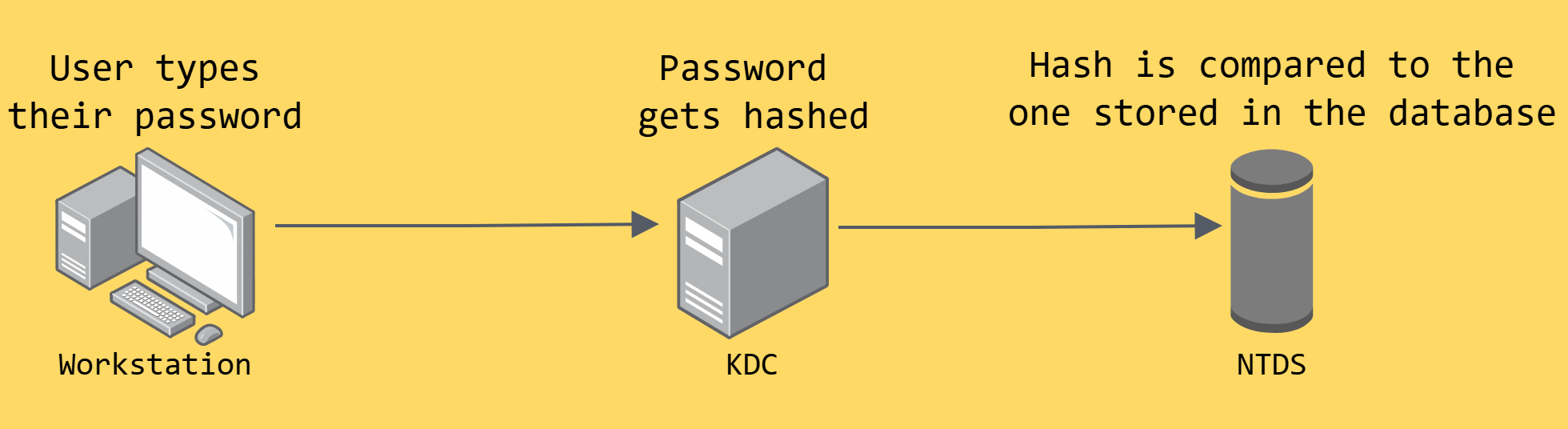
NTDS is encrypted and, therefore, unusable (for our purposes) by itself. To decrypt it, we need the encryption key, also known as Boot Key or Syskey from the SYSTEM registry hive. As you will see later, this detail is relevant to the VSS method.
The NTDS extraction process is typically done remotely from a Kali host and it comes down to two methods: DCSync (default) and VSS (-use-vss). The plan is to see what these approaches are (at a high-level) and how secretsdump implements them.
Let’s start with the default one.
DCSync (via DRSUAPI)
Replication
As there are typically many Domain Controllers (DCs) within a domain, it makes sense for every DC to have a copy of the NTDS. Otherwise, it would get messy real quick!
This is done via the Replication process, which is how DCs are keeping in sync with each other. This process happens on regular intervals through the Directory Replication Service Remote Protocol (MS-DRSR).
DRSUAPI is one of the two RPC interfaces of DRS and, as I get it, its name is a combination of three things:
- DRS → the Directory Replication Service remote protocol
- U → the fact that DRS is used to update (i.e., sync) the DCs
- API → the Application Programming Interface that is used to implement this update
DCSync abuses the assumption that certain permissions (more on that later) are only granted to highly trusted entities (like DCs). It kind of “impersonates” a DC and then asks a real DC to sync with us.

You might be wondering: How does our host impersonate a DC?
The short answer is: it doesn’t. The (legit) DC exposes the replication functionality (via DRSUAPI) to any authenticated client that has the appropriate permissions; it never verifies whether the client is a DC or not.
The reality is that we don’t actually want to fully impersonate a DC anyway. The actual DC-to-DC replication process has some protections in place: communication is typically performed using Kerberos, with mutual authentication (so both sides verify who they’re talking to) and encryption (so the exchanged data stays safe in transit).
As an example, if we were fully impersonating a DC, we probably wouldn’t be able to use NTLM authentication (-hashes). We are able to do so because when a non-DC host connects to a DC, the latter couldn’t give a puck about enforcing secure communication; as long as we have the right permissions, we can simply call the DRSUAPI replication interface.
DCSync leverages the legit replication process, while bypassing the assumptions those protections rely on!
At first glance, the fact that the DC does not verify that the client is also a DC might seem like a major security gap. However, the replication process needs to be used by more systems than just DCs, such as backup tools and monitoring software, so, it cannot realistically be restricted to just them.
It is also worth noting that when Kerberos is used as the authentication method, the client constructs a very specific Service Principal Name (SPN) for the replication service, which looks like this:
E3514235-4B06-11D1-AB04-00C04FC2DCD2/<target DC GUID>/<domain's fully qualified domain name (FQDN)>
         └─ Fixed DRS interface GUID (same for every DC)
For example, if we are requesting data for the MOLLYSEC.LOCAL domain from DC01 (with a GUID of f8a7c3d2-4b9e-4a1f-9d6c-2e5f8b3a7c14), the SPN would look like this:
E3514235-4B06-11D1-AB04-00C04FC2DCD2/f8a7c3d2-4b9e-4a1f-9d6c-2e5f8b3a7c14/mollysec.local
When we see Kerberos errors, like KDC_ERR_S_PRINCIPAL_UNKNOWN, it often means something is not right with this SPN. This is why specifying a DC by its IP address can cause authentication problems; the SPN expects a proper FQDN (falling back to NTLM authentication, e.g. using -hashes, often works around the problem).
Obviously, not everyone can ask a DC for data, that would be glaikit. However, Domain Admins (and DCs of course!) have the following two required permissions:
Why we need both, will become clear soon.
Replicating Directory Changes In Filtered Set might also be needed when dealing with RODC, but that had never happened to me during my extensive three months-career doing internal testing.
The (High-Level) DCSync Process
Before we can request anything, we first need to authenticate. When we do, the underlying authentication process (Kerberos or NTLM) establishes a session key. This key is used to encrypt and sign all subsequent communication with the DC.
When we run secretsdump, we are essentially triggering a sequence of IDL_DRS calls. The three core ones are described below.
1. The Handshake (IDL_DRSBind)
As per Microsoft:
IDL_DRSBindcreates a context handle that is necessary to call any other method in this interface.
The context handle (DRS_HANDLE) is similar to a session cookie; it proves that we’ve successfully authenticated and are authorised to make replication requests. It remains valid for all subsequent operations until we explicitly call IDL_DRSUnbind or the server invalidates it (e.g., due to timeout or errors).
When a tool fails with a bind failed error, something has gone wrong in this step!
So the handle acts as a session identifier for the API, while the session key protects the data exchanged within it. secretsdump establishes a DRS session with the DC via the DRSBind method:

2. Replicating Data (IDL_DRSGetNCChanges)
This is the function that actually replicates directory data from the DC to our host.
To call this function we need the Replicating Directory Changes permission (1/2). However, just calling IDL_DRSGetNCChanges only returns non-secret directory data (e.g. usernames, group memberships, OUs, etc.) and deliberately excludes credentials.
To get the actual credentials, we need to include the EXOP_REPL_SECRETS flag. In order to do that, we need the Replicating Directory Changes All permission (2/2).
After secretsdump has established the session and has the handle going, as we would expect, it calls DRSGetNCChanges along with the EXOP_REPL_OBJ flag:
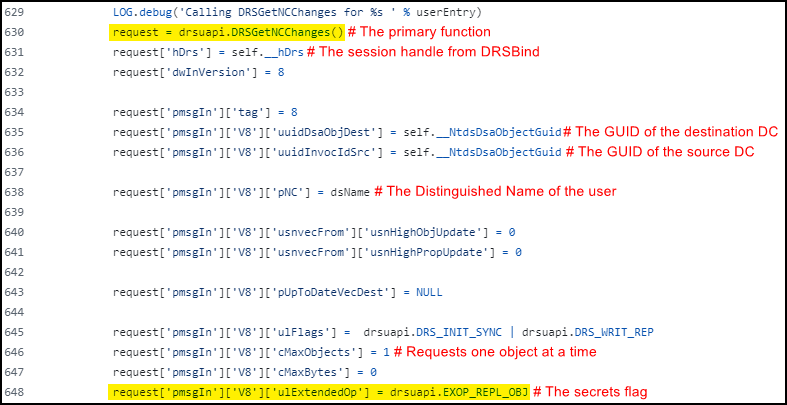
The uuidDsaObjDest and uuidInvocIdSrc variables normally represent the destination and source DCs participating in the replication operation. Since our host is not a real DC, secretsdump cheekily sets both values to the target DC’s GUID to make the request appear legitimate.
3. The Cleanup (IDL_DRSUnbind)
Once we’ve replicated what we need, my assumption was that secretsdump would call IDL_DRSUnbind to explicitly close the connection and release the DRS_HANDLE. However, I could not find any indication that this function is called within the script. Once again, it seems that my assumption was wrong!

Replication vs DCSync
Although OPSEC considerations are out of scope, it is worth noting that there are some major behavioural differences between the replication process and DCSync. Some of them are listed below.
| Replication | DCSync |
|---|---|
| Requests all changes since last sync (incremental) | Requests specific objects with secrets (targeted) |
| Updates replication metadata to track sync state | Doesn’t do any of that |
| Ongoing background process between DCs | One-time operation initiated by a non-DC host |
| Requests everything (objects, attributes, etc.) | Requests just credential-related attributes |
Now that we are DCSync experts, let’s see what VSS is about.

VSS
The Problem
The Volume Shadow Copy Service (VSS) method (-use-vss) is a completely different approach from DCSync. The overall goal here is to create a copy of the NTDS. However, a file cannot be copied if it is actively being used. In an AD environment, NTDS is used 24/7, therefore, it is effectively always locked!

VSS solves that problem: instead of trying to copy the locked file directly, it creates a snapshot (i.e., a read-only point-in-time copy) of the DC’s entire volume (e.g. C:\). Within this snapshot, NTDS (and SYSTEM!) is no longer actively in use, meaning it is no longer locked, and, therefore, can be safely copied.

It should be noted that the permission to create a shadow copy (SeBackupPrivilege) is typically assigned only to Administrators and members of the Backup Operators or Server Operators groups.
Let’s see how the VSS process looks like.
The (High-Level) VSS Process
1. DC Access
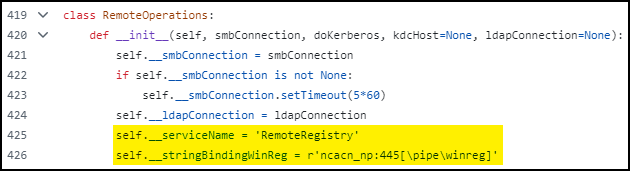
First, we need to access the DC; secretsdump does that by connecting to the DC’s Service Control Manager (SCM) (the Windows component that manages services) via RPC over SMB and starting the RemoteRegistry service. As the name implies, this service allows remote access to the registry, which is needed to extract the SYSTEM hive:
2. Shadow Copy Creation
Next, we need to create a shadow copy of the volume containing the NTDS (e.g. a snapshot of the C:\ drive). To do that, secretsdump executes vssadmin on the DC, which (by default) creates a temporary service via SCM:

3. File Extraction via SMB
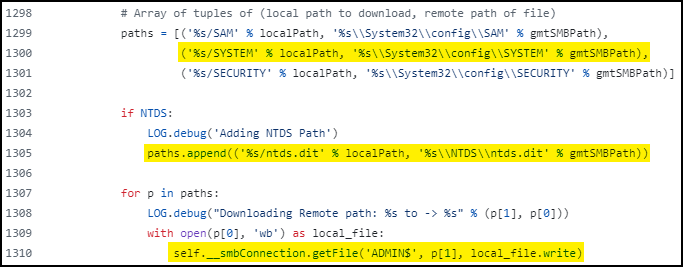
To copy the target files (NTDS and SYSTEM), we need to access the snapshot via its kernel device path (e.g. \\?\GLOBALROOT\Device\HarddiskVolumeShadowCopy1\). secretsdump does that via the ADMIN$ share and uses SMB to copy both files from the snapshot to the target machine:
4. Shadow Copy Deletion
After copying the files, the snapshot gets deleted:

DCSync vs VSS
Here is a handy table with the major differences between the two:
| Aspect | DCSync | VSS |
|---|---|---|
| Protocol(s) | RPC (DRSUAPI calls) | RPC (SCM) + SMB (file transfer) |
| Permissions | DA level or similar (e.g. DC$) | LA level or similar (e.g. Backup Operators) |
| Granularity | Targeted (specific accounts) | Bulk (entire database) |
| Speed | Fast (streaming data) | Slow (snapshot + file copy) |
| Decryption | Session key from DRSBind | Syskey from SYSTEM hive |
As you can see, DCSync is the default method for a reason: it is fast, granular, and only uses RPC. So why would we ever want to use the slower, bulk VSS method, I hear you ask?
A scenario that VSS could be useful is when we don’t have replication permissions, but we are an LA on a DC or we have Backup/Server Operators membership. Another scenario is when the RPC ports required for DCSync are blocked but SMB access is still available.
Both of these scenarios don’t really apply to the password audit process, but it is never bad to have a backup method!
Secretsdump
Most of us use secretsdump directly or indirectly (e.g. via wrappers like NetExec). But, if you are like me, there is a good chance that you don’t make full use of its functionality. So I thought that it might be useful to list out some potentially underused flags for reference:
| Flag | Description |
|---|---|
-just-dc | Extracts only NTDS data, i.e., NTLM hashes and Kerberos keys. |
-just-dc-ntlm | Extracts only NTLM hashes, faster for large domains. Do we even need Kerberos keys? |
-just-dc-user | Extracts credentials for a target user, can be useful for validation. |
-history | Includes the ntPwdHistory and lmPwdHistory attributes, useful for checking patterns. |
-resumefile | Tracks progress by recording the last successfully processed user’s SID. If extraction is interrupted, subsequent runs can resume from the last checkpoint rather than starting over. Who wants to start over? |
-outputfile | Generates .ntds (NTLM hashes), .ntds.cleartext (cleartext passwords), .ntds.kerberos (Kerberos keys), .sam (SAM database hashes), .secrets (LSA secrets, cached credentials, and machine account passwords). Organisation is key! |
-pwd-last-set | When each password was last changed based on the pwdLastSet attribute, again, useful for checking patterns. |
-user-status | Show whether accounts are enabled, disabled, or locked. Do we even need disabled accounts on our data? |
Honorable Mention
As we now know, secretsdump’s DCSync uses a multi-protocol approach that requires both SMB (authentication) and RPC (DRSUAPI calls) access. In addition, when Kerberos is used, we need to have the CIFS/domaincontroller SPN.
Let’s say that SMB access is blocked and VSS cannot be used as an alternative. In this case, we can use LDAP! Mimikatz’s DCSync implementation uses LDAP for the authentication part and then, like secretsdump, RPC for the DRSUAPI calls.
However, for most internal assessments, this distinction is just a good to know thing; all required ports are typically available.
| Command | Description |
|---|---|
lsadump::dcsync /domain:mollysec.local /all /csv | Complete extraction. |
lsadump::dcsync /domain:mollysec.local /user:Administrator | Targeted extraction. |