Introduction
The hash-organiser, ntds-organiser, and password-analyser tools mentioned in this article were intially created as PoCs. Their functionality have now been integrated into password-audit.
We extracted the NTDS, organised it, and finally recovered as many hashes as our timeframe and available resources allowed. We have now reached the final part of the process!
Now, it is time to produce some value from analysing our final dataset!
Extract NTDS → Clean/Organise NTDS → Crack Hashes → Analyse Results
At this point, we have a collection of recovered credentials (the Hashcat .potfile) and a rough understanding of how successful our password-cracking process was. However, simply knowing that a certain percentage of hashes were recovered does not say much.
For example, imagine that we recovered 263 passwords from a domain. What does that actually mean? On its own, the number provides little context. Thus, our goal is to build that context ourselves by analysing the recovered hashes, while producing as little noise as possible. By noise I mean statistics that provide little meaningful value beyond filling report space.
For example, many tools include metrics like:
The top
Xcharacters used were:
Character Times Used Percentage a 50 65% o 45 63% …
Don’t get me wrong, I like statistics as much as the next guy. I have actually done (on purpose!) many stats-related courses during my university years and fiddling with R for my MSc’s thesis was what motivated me to switch careers in the first place!
But let’s be honest for a second. What value is really gained from knowing that the letter a appears more frequently than the letter o? Who really cares, and more importantly, how does this type of statistic find its way into an actual report?
The aim here is to think about what questions we should be asking, make sure that answering them provides value and can ultimately lead to actionable remediation. In other words, we want to move from throwing plain statistics on a report:
The following list of
Xusers violated the password policy:
User Password Length user1 W******1 8 user2 W********! 10 …
to actual findings:
The domain enforced a minimum password length requirement of
Xcharacters. Analysis of the recovered credentials identifiedYpasswords (Z% of recovered passwords) that did not comply with this requirement. The most frequently observed non-compliant password length wasWcharacters, while the most commonly observed password length overall wasUcharacters.The following password length distribution was observed across the recovered credentials:
Length Count Percentage 7 4 1.5% 8 11 4.2% …
I am not saying that the second one is perfect by any means, but I believe we can all agree that is definitely an improvement from the first!
Having identified the questions worth asking, and staying true to the trend of our era, we will finish by vibe-coding a small Proof-of-Concept (PoC) tool to automate the analysis process.
Let’s dive in!
Asking the “Right” Questions
So we have cracked an NTDS dataset and recovered some hashes (which is cool by itself!). What are the major risks that are hidden within this dataset? Some questions that might help uncover these risks are:
- How many hashes were recovered?
- Were any privileged accounts recovered?
- Are any recovered passwords non-compliant with the domain password policy?
- Are any passwords being reused across multiple accounts?
- Are similarly named accounts sharing passwords?
- Do recovered passwords exhibit common weak patterns?
Let’s see how each one of these questions could potentially help us improve the security of the domain.
The percentage of recovered hashes could help us set our expectations before we even start our analysis. For example, imagine we cracked 6% versus 60% of NTDS. Most likely, the latter points to weak password selection practices, password reuse, ineffective password policy enforcement, or a combination of the above.
Now the second question is a bit more tricky, because the definition of “privileged” is open to interpretation. Most people here would include the obvious choices, such as Enterprise Admins (EAs) and Domain Admins (DAs). This makes sense as gaining control of an account that belongs to one of these groups can, more often than not, result in full domain compromise.
However, are these groups the only ones that represent a serious threat for a domain? What about Account Operators, Backup Operators, Cert Publishers, and DNS Admins, among many others? Compromising a member of one of these groups can alson provide a pathway to full domain compromise.
Now, non-compliant accounts can exist for various reasons. They can be the result of legacy accounts (i.e. accounts created prior to the current policy), accounts configured with Password Not Required, or the result of Fine-Grained Password Policies (FGPPs). No matter what the cause is, these should be reviewed by the business and decide if there is a valid reason for violating the domain policy or not.
Then, there is password reuse. For example, there might be users “forced” to use different accounts for different tasks, e.g. mike and mike_admin. Although this is best practice, it can also create a false sense of security. Imagine if Mike uses the same password for both accounts: compromising the lower-privileged account will potentially provide immediate access to the higher-privileged account!
Finally, identifying recurring patterns is where password analysis becomes particularly useful. Whilst a single weak password may not reveal much on its own, hundreds of recovered passwords can reveal common user behaviours and password construction habits.
We can identify usernames within passwords (e.g. mikePassw0rd), date-related strings (e.g. Monday2026), commonly used dictionary words (e.g. Welcome123!), organisation-related strings (e.g. MyCompany123!), keyboard walks (e.g. qwerty), and the list goes on!
Let’s see how the above questions could potentially map to a step towards making the domain more secure:
| Vulnerability | Example Remediation |
|---|---|
| Large Percentage of Passwords Recovered | Review password policy |
| Privileged Accounts | FGPPs and MFA for privileged accounts |
| Non-Compliant Passwords | Review legacy accounts and policy exceptions |
| Password Reuse | Separate passwords for standard and privileged accounts |
| Predictable Password Patterns | User education and banned-password lists |
Nothing of the above is really complex and every answer provides a direction and an actionable step for improving the domain’s security. The challenge, therefore, is not generating statistics but identifying which statistics are actually useful.
Obviously, there are a lot more questions to ask and even answering just the above small set of questions is hard to be done manually. So let’s see how we can automate this process with a little bit of vibe-coding.
Automating the Process with Password-Analyser
Identifying useful questions is only half of the process. The next challenge is answering them consistently across multiple assessments in an easy-to-digest format.
For a small dataset, many of the findings discussed above could be identified manually. However, as the number of recovered credentials increases, the process quickly becomes time-consuming and repetitive. In addition, performing the analysis manually is not a particularly good use of time and increases the likelihood of errors and inconsistencies between assessments.
Whilst several password auditing tools already exist, such as Pwdlyser and Password Auditor, some are no longer actively maintained while others cannot be easily customised. This is the main reason for developing the password-analyser PoC.
As always, the goal here is not to do anything fancy, but a small quality of life improvement. This PoC consumes a small collection of input files and produces statistics, evidence tables, and “report-ready” commentary. Before looking at the output, it is worth briefly explaining where the tool obtains its data.
On part 2 of this series, I introduced hash-organiser. Since then, I created its big brother, ntds-organiser, which does kind of the same job but much better. The password-analyser script uses ntds-organiser’s output files along with the Hashcat .potfile to perform the analysis.
The workflow looks like this:
- Extract credentials with
secretsdump.py→ obtain the.ntdsfile. - Process the
.ntdsfile withntds-organiser→ generate the required datasets, includingntlm-hashes.txt. - Crack
ntlm-hashes.txtwithhashcat→ obtain the.potfile. - Use
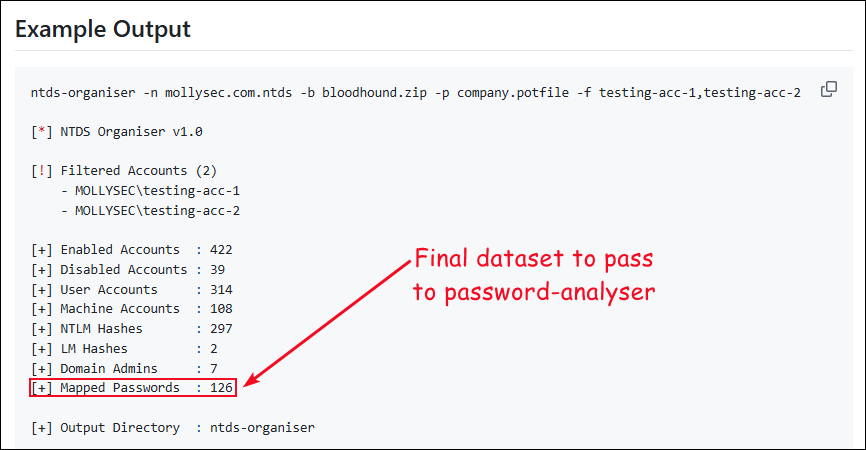
ntds-organiserto map recovered hashes to user accounts → generatemapped-passwords.txt. - Analyse the resulting dataset with
password-analyser→ generate findings, statistics, and commentary.
For the curious reader, these are the files generated by ntds-organiser:
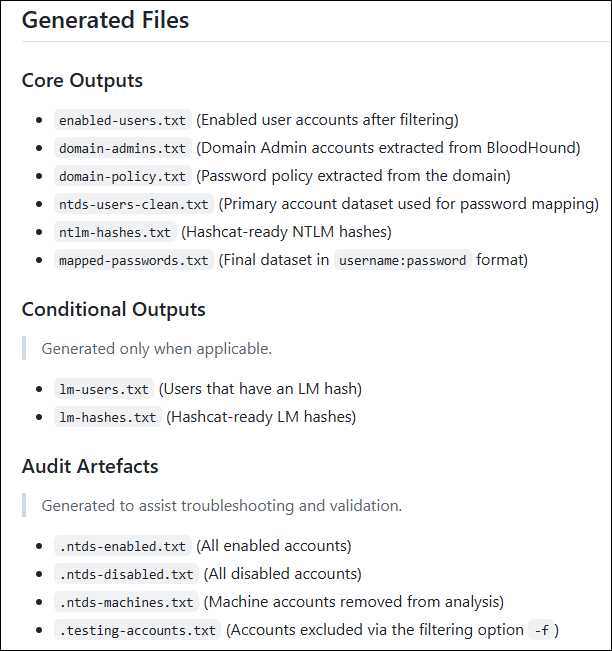
With the workflow in place, let’s look at the end result and see whether the generated output actually answers the questions identified earlier in this article. At the moment, the fourth step would look like this:
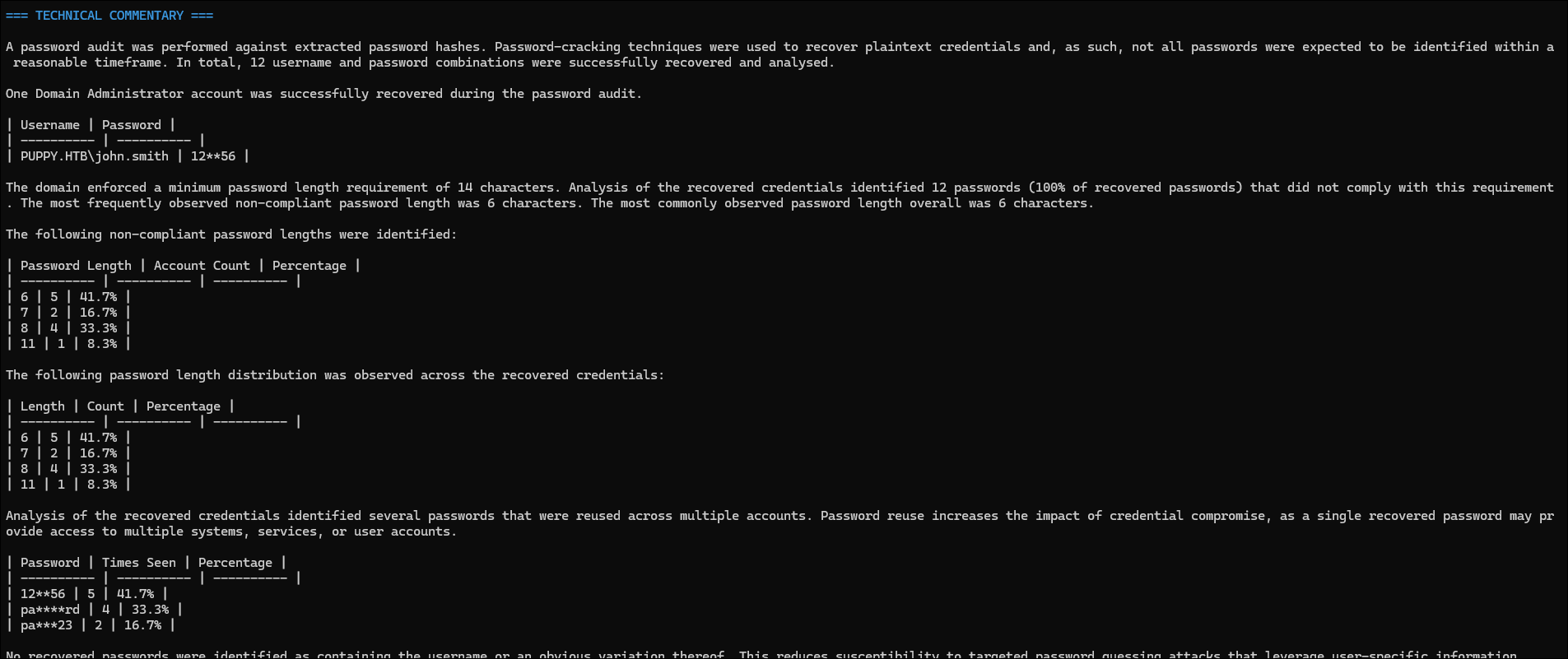
Then, the analysis would generate the following three sections (open the images in a new tab):
The wording, especially in the technical commentary section, is not yet fully polished as I am still refining the script’s functionality.


Conclusion
At first glance, the final stage of a password audit might appear to be little more than generating statistics from a collection of recovered credentials. However, as we have seen throughout this article, the real challenge lies in identifying which statistics are actually useful.
Simply reporting a bunch of numbers provides limited value on its own. The important questions are the ones that help explain why those passwords were recoverable in the first place and what should be done to reduce the likelihood of future compromise. The goal of the analysis stage is therefore not to determine how many passwords were recovered, but to understand what those passwords reveal about the organisation’s password selection practices. In that sense, statistics are simply a means to an end; the real objective is to generate findings that support meaningful remediation.
Whilst the tooling presented throughout this series is intentionally simple, I hope the process itself provides a useful starting point for anyone performing Active Directory password audits.
Now, if you’ll excuse me, I have a few PoCs to keep over-engineering!