Introduction
After writing some articles about (what are considered to be) “boring” topics, such as SMB / LDAP signing, email security, and firewalls, I thought I’d dive into something a bit more exciting.
Password spraying is a topic I had wanted to explore for quite some time. I had also starred tools such as conpass, but never found the opportunity to explore the underlying concepts in more detail. Until now.
In this article, I won’t try to replicate hackndo’s post, although there will be some duplicated information for context purposes, but rather act as a complement to it. As such, some concepts, like GPO and PSO ordering, won’t be explained but links for further reading will be provided instead.
Let’s get into it!
Group Policy Objects (GPOs)
The major concern when conducting a password spraying attack is account lockouts. If you lock an account out, they will have to ask their (probably understaffed!) IT department to unlock their account and in this way negatively interfere with the organisation’s day-to-day operations. Imagine locking hundreds or thousands accounts out!
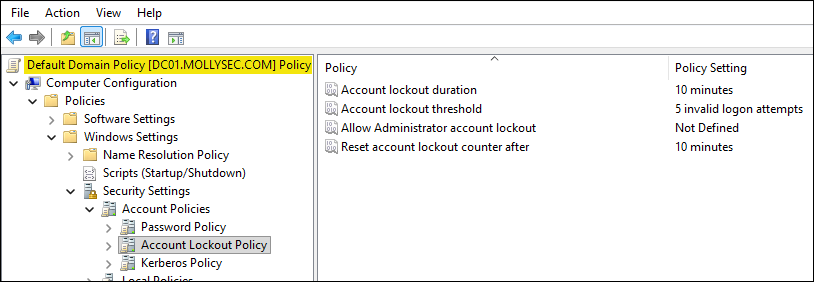
To avoid the above scenario, the easiest thing to do is take a look at the Account Lockout Policy settings of the Default Domain Policy Group Policy Object (GPO). The settings we care about from a password spraying perspective are the following:
- Lockout duration → how long a locked account remains unusable before it is automatically unlocked.
- Lockout threshold → the number of failed authentication attempts that will trigger an account lockout.
- Reset account lockout timer (observation window) → the amount of time a user must avoid failed authentication attempts before the accumulated bad password count is reset.
All standard users can read the domain’s default password policy, for example, using nxc’s --pass-pol flag:
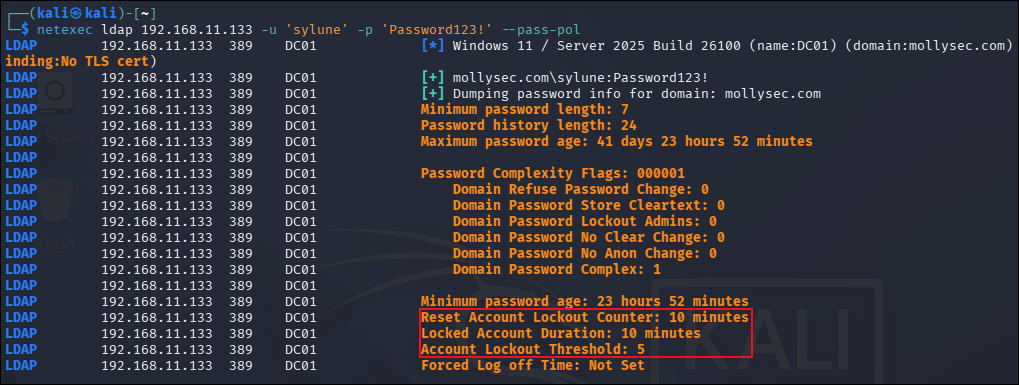
The minimum effort we could do in order to avoid lockouts is to adjust our password spraying strategy to the domain’s password policy. For instance, based on the above policy we could spray three passwords every 10 minutes for each user. This way, we would leave room for the legit user to be able to make a failed authentication attempt without being locked out.
However, we must keep in mind that additional GPOs can define password and account lockout policies. When multiple GPOs contain such settings, only the effective domain password policy matters. The good news is that standard users can also enumerate the order in which GPOs are applied and therefore infer the effective password policy. We won’t dive into how this works, but feel free to read about it here.
Spoiler alert, this can be done via the gplink attribute.
Fine Grained Password Policies (FGPPs)
A Fine-Grained Password Policy (FGPP) is an AD feature implemented through Password Settings Objects (PSOs). A PSO contains the same password and account lockout settings traditionally configured in the Default Domain Policy, but can be applied directly to specific users and groups, enabling multiple password policies to coexist within the same domain.
PSOs are stored within the Password Settings Container under the System container. When a PSO applies to a user, it overrides the password and account lockout settings defined in the Default Domain Policy:
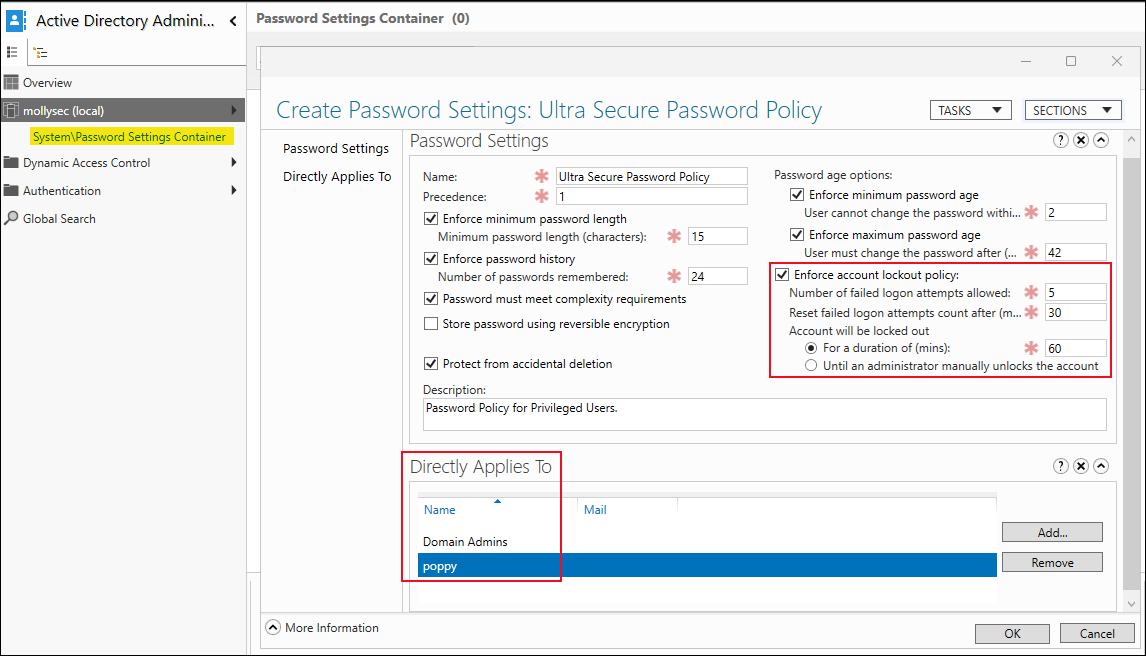
If multiple PSOs apply, the Precedence attribute is used to determine the effective policy, with lower values taking priority and therefore winning the precedence evaluation. The problem with FGPPs is that standard domain users cannot enumerate their settings:
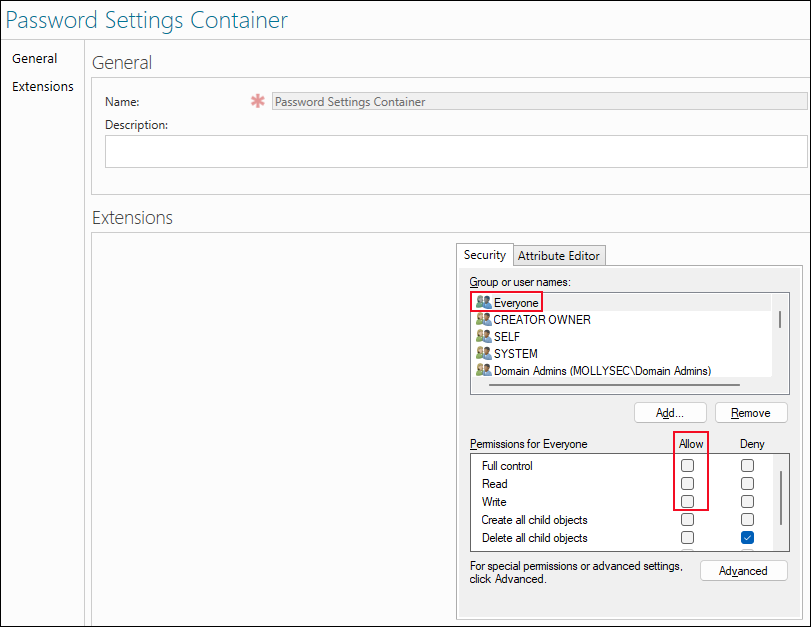
As a result, we cannot reliably determine the lockout thresholds applied to affected accounts. We might retrieve the domain password policy, carefully plan a password spraying campaign around it, and still lock out users governed by a more restrictive FGPP.
For example, if we try to enumerate PSOs as a standard user, we can only determine whether any exist:

In contrast, a Domain Admin can enumerate all of their settings:
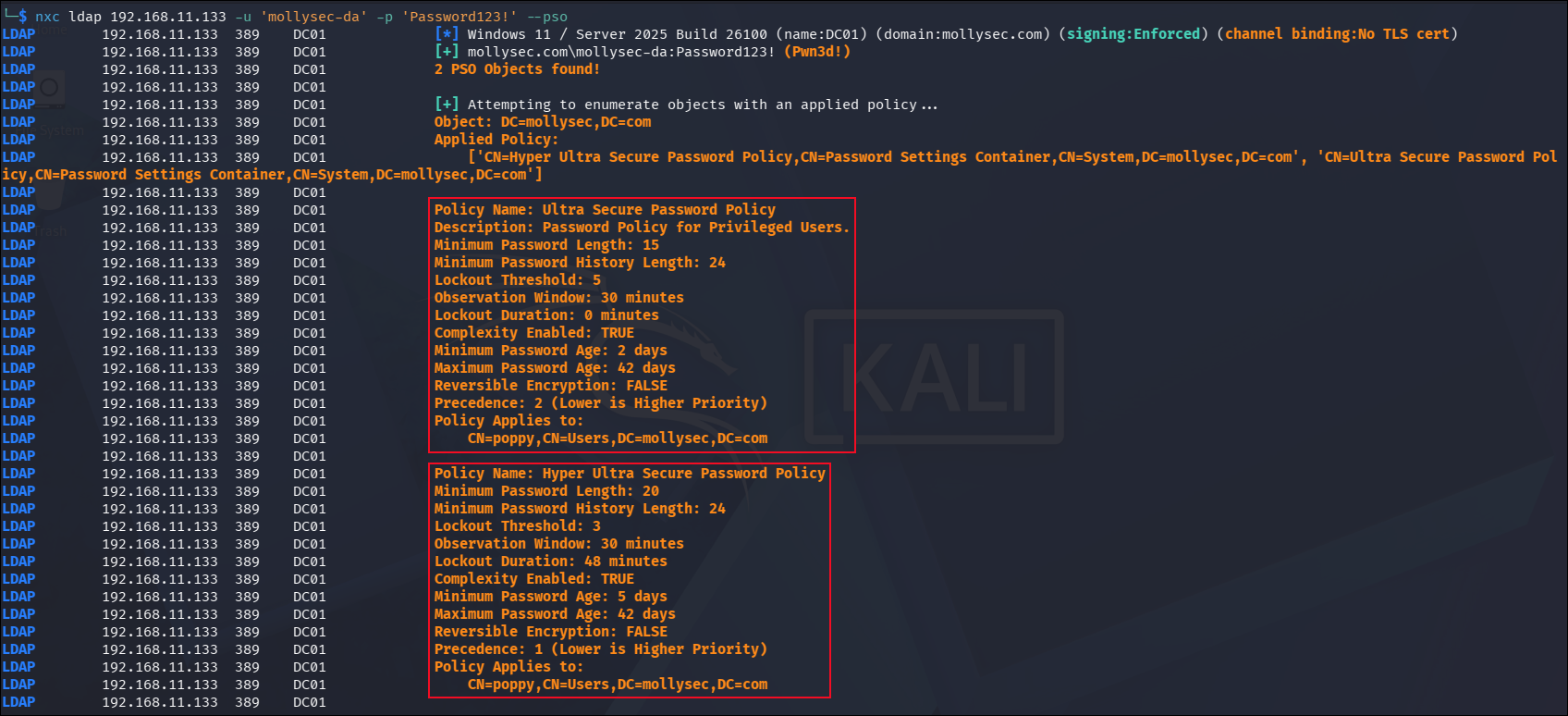
Don’t despair yet though!
Fortunately, there are two world-readable attributes that indicate whether an FGPP applies to an object:
- The
msDS-PSOAppliedattribute contains all PSOs applicable to the target object. - The
msDS-ResultantPSOattribute contains the effective PSO after precedence evaluation has been performed.
Thus, if either attribute is present on a user object, we know that the account is governed by an FGPP. Since standard domain users cannot read the associated settings, the safest approach is to exclude such accounts from the spraying dataset altogether.
For example, sylune does not have any of these attributes so we can assume that the default password policy is applied to them. On the other hand, poppy has the msDS-PSOApplied attribute, indicating that an FGPP applies to the account:

The msDS-ResultantPSO attribute is a constructed attribute, meaning that its value is calculated from other AD attributes rather than stored directly on the object. Constructed attributes are not returned by default during LDAP enumeration and cannot be modified manually:
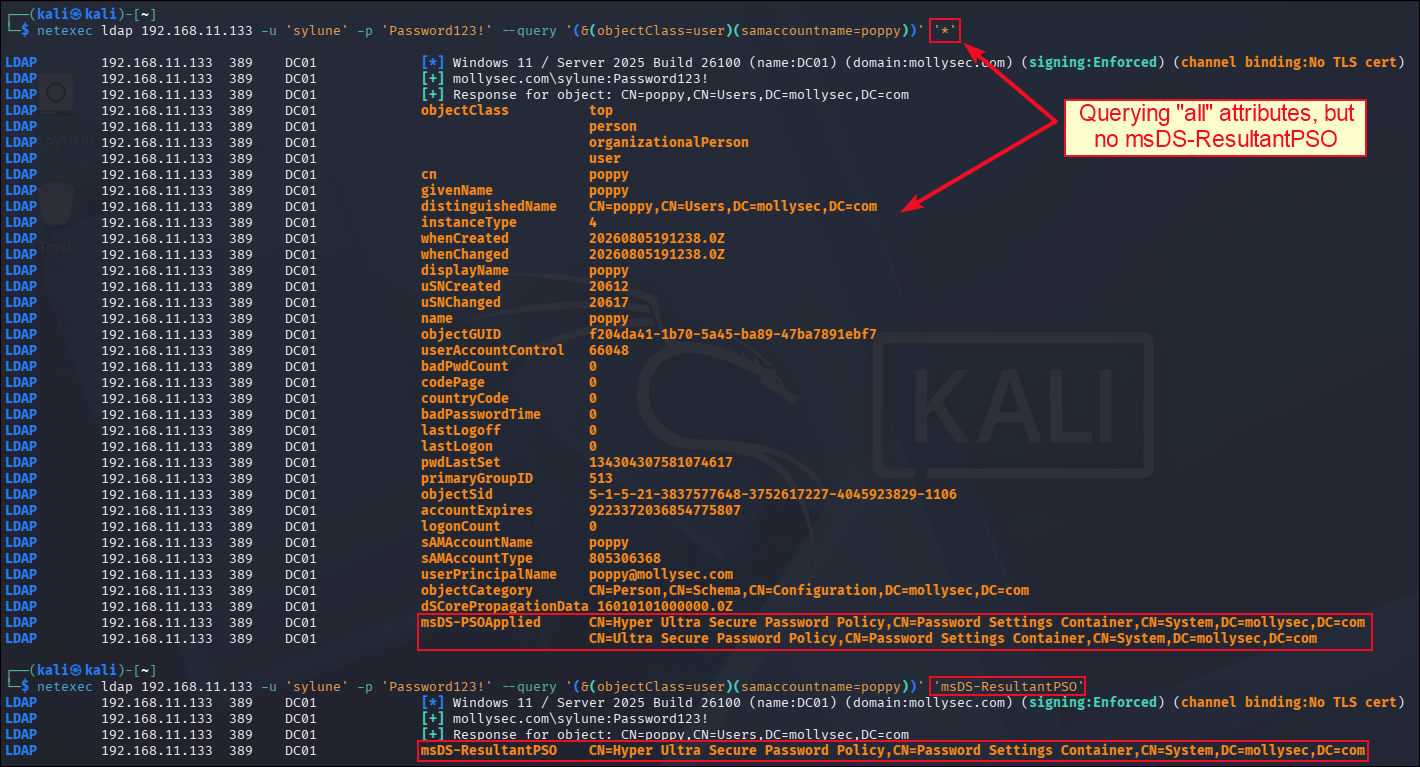
This behaviour makes sense from a performance perspective.
To determine the value of msDS-ResultantPSO, AD must first identify all PSOs that apply to the target object, evaluate their precedence values, and determine which policy ultimately wins. This is considerably more expensive than simply returning the list of applicable PSOs through the msDS-PSOApplied attribute.
The badPwdCount Attribute
Let’s now talk about the badPwdCount attribute, how it works, and how it relates to the lockout process. For a more detailed description (along with some nice diagrams!) see here.
The badPwdCount attribute represents the number of times the user tried to log on to the account using an incorrect password. When a user attempts to log into a Windows domain, the following steps take place:
- The Domain Controller (DC) checks if the account is locked.
- If it is not, it will then check if the provided password is valid.
- If it is, the user gets authenticated, and
badPwdCountresets to0. - If the password is not valid, the user gets a logon failure message and the
badPwdCountis incremented by1. - If the failed password attempts reach the
lockoutThresholdvalue, the account will be locked and thelockoutTimeattribute will be filled in.
The badPwdCount attribute, unlike most others, is a non-replicated attribute which means that it is maintained separately on each DC in the domain. This means that different DCs can legitimately hold different badPwdCount values for the same user at the same point in time. However, this does not mean that we can (safely) spray passwords against each DC independently (we will see this in practice soon).
Since some attributes are intentionally non-replicated, AD still requires a way to make consistent security-sensitive decisions in order to avoid conflicts across the domain. To address this, AD uses the Flexible Single Master Operation (FSMO) roles, where specific DCs are assigned responsibility for particular operations.
There are five FSMO roles in total, but from a password spraying perspective we are primarily interested in the PDC emulator role. The DC holding this role serves as a coordination point for authentication-related activities across the domain, including password validation and account lockout processing.
In our test lab, DC01 holds the PDC Emulator role:
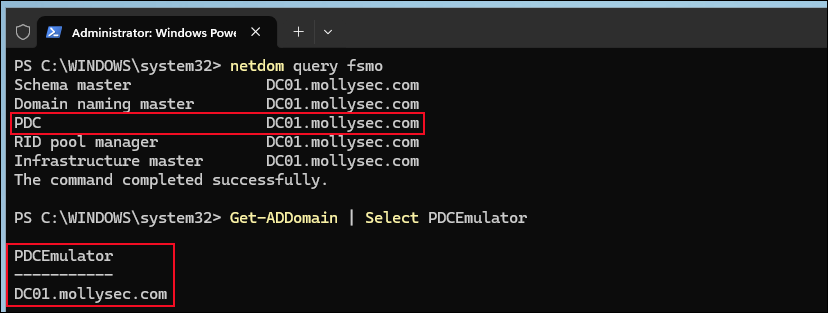
When I first read about the PDC role, I thought that querying the DC that holds it is all we need to learn the value of badPwdCount for a target object. This turned out not to be the case, as the PDC does not hold an authoritative copy of badPwdCount.
Let’s validate all the above with an example.
The user fails authentication two times against DC02 (badPwdCount = 2) and one time against DC03 (badPwdCount = 1). The PDC (DC01) is updated as failed authentication attempts occur. In this example, its badPwdCount value reflects the combined failed authentication attempts observed across DC02 and DC03, resulting in a value of 3.
Notice that if the user successfully authenticates against DC01, the badPwdCount attribute does not reset globally (on all DCs) but just locally (on DC01):
Do your eyes a favour and open the following screenshots in a new tab.
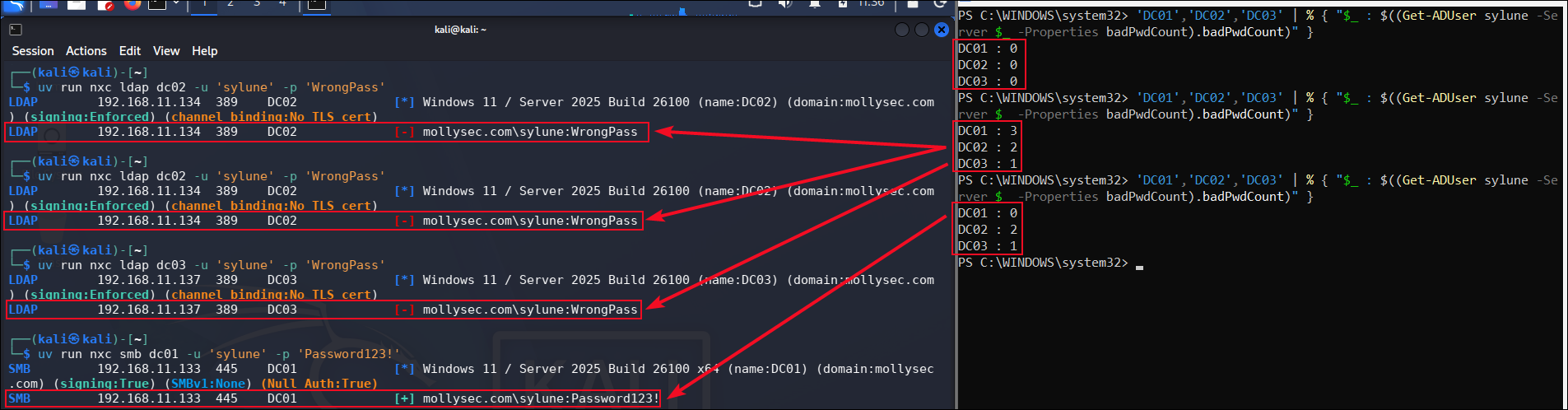
As a result, if the user performs three more failed attempts against DC02, the account will be locked:
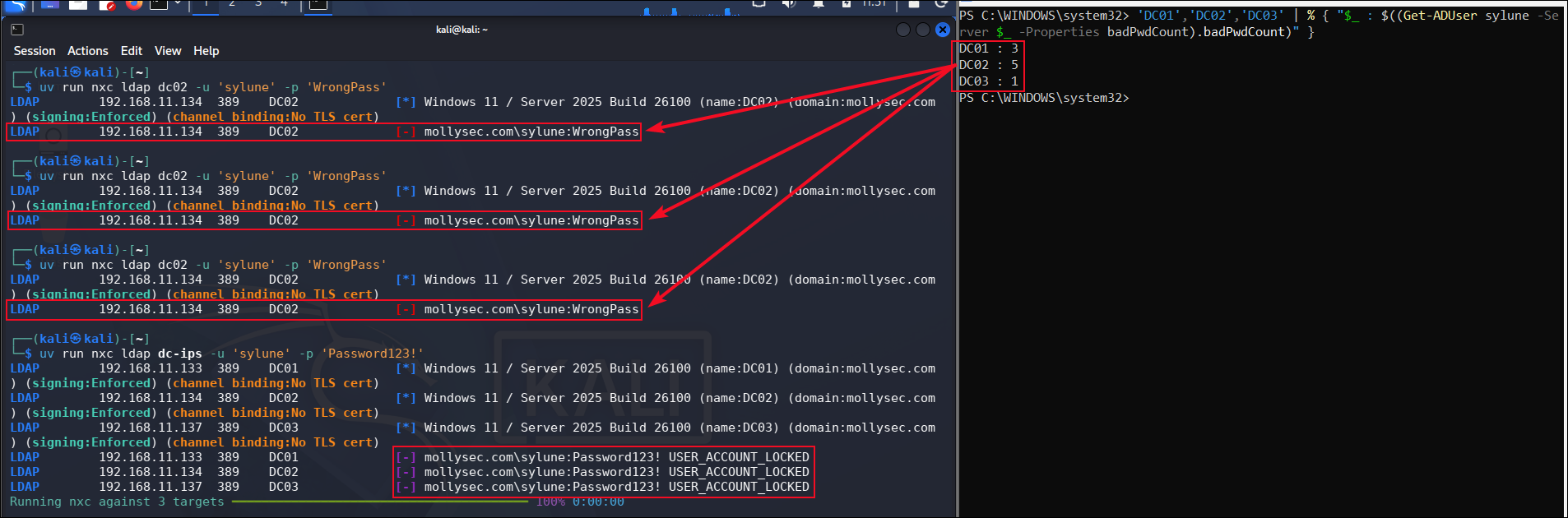
However, if the user authenticates successfully on a non-PDC DC, for example, DC02, this would be forwarded to the PDC (DC01), so the badPwdCount value would be reset on both DC01 and DC02 (but not on DC03):

This behaviour exists to prevent us from bypassing lockout thresholds by distributing failed authentication attempts across multiple DCs, even though the individual badPwdCount values themselves remain non-replicated.
For the Wireshark fans out there, packet captures reveal how non-PDC DCs communicate authentication-related events to the PDC, allowing it to participate in lockout decisions even though badPwdCount itself is not replicated:
- When a user performs failed authentication attempts against a non-PDC DC (in this case,
DC02), each failed attempt results in a correspondingNetrLogonSamLogonExexchange betweenDC02and the PDC (DC01). - If the user authenticates successfully against the PDC (
DC01), thebadPwdCountvalue is reset locally onDC01, but no corresponding update is observed onDC02. In contrast, when the user authenticates successfully against a non-PDC DC (i.e.DC02), aNetrLogonSendToSamexchange is observed betweenDC02and the PDC (DC01). Following this exchange, thebadPwdCountvalue is reset on bothDC02andDC01, but not on other DCs.
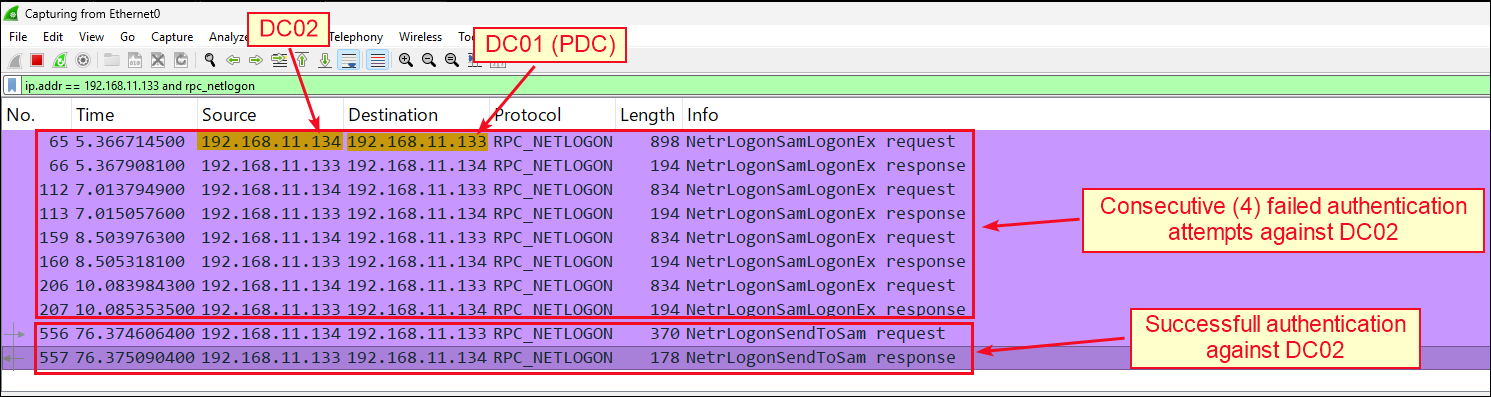
This behaviour explains why tools such as conpass query every DC and use the highest observed badPwdCount value instead of just querying the PDC!
The N-2 Rule
The n-2 rule is a niche AD behaviour that I had no idea about until recently. I first read about this on Richard Mueller’s blog post. This is a case where failed authentication attempts do not increase the badPwdCount attribute!
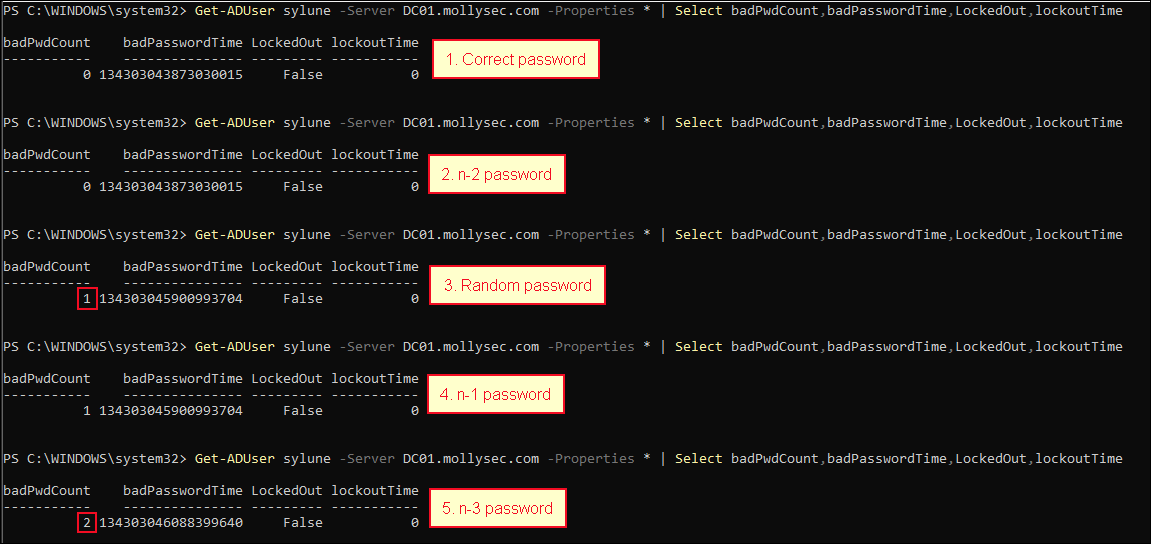
In brief, if the password attempted matches either of the two most recently used historical passwords (n-1 or n-2), the authentication attempt fails but badPwdCount is not incremented. The rationale behind this behaviour is to avoid punishing users who accidentally attempt to authenticate using a recently changed password.
Let’s validate this with another example.
We have the user with the following password history:
| Position | Password |
|---|---|
| n (current) | Password123! |
| n-1 | Password0! |
| n-2 | Password1! |
| n-3 | Password2! |
In the example below, the user attempts to authenticate using the n-2 and n-1 passwords on the 2nd and 4th attempts, respectively:
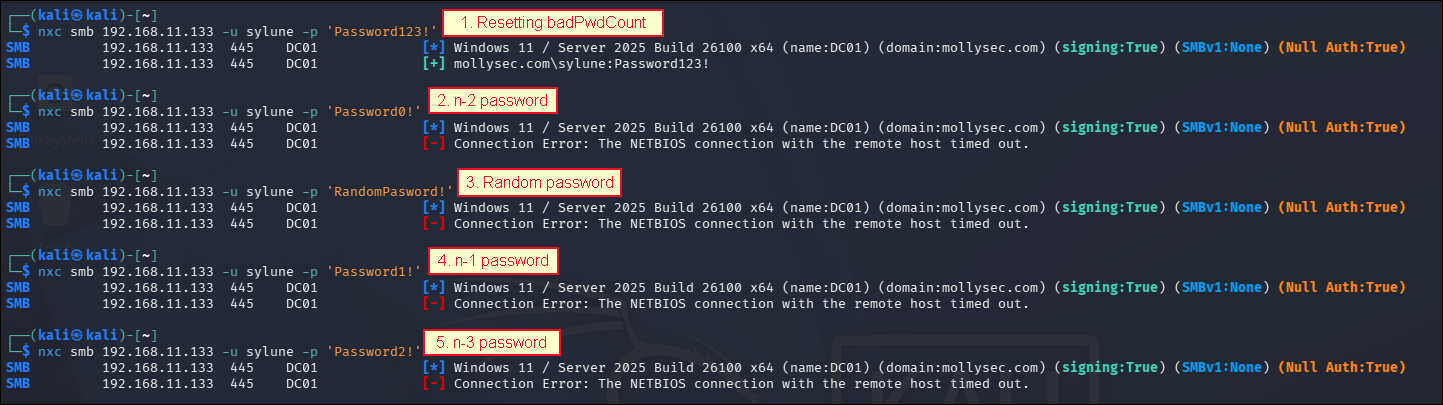
We can confirm that only the 3rd and 5th attempts incremented badPwdCount, while the 2nd and 4th attempts did not:
An interesting question is whether these events could be tracked during a password spraying campaign and subsequently used to infer the current password from a previously known one. I think my next conpass PR might have just written itself!
Conclusion
As we have seen throughout this article, avoiding account lockouts during a password spraying campaign is considerably more complex than it might initially appear.
Determining whether a single authentication attempt is safe may require knowledge of the effective domain password policy, any FGPPs applied to the target account, the maximum badPwdCount value observed across all DCs, and even the possibility of legitimate failed authentication attempts by the user.
This complexity explains why mature spraying tools invest significant effort into policy enumeration, account state tracking, and anti-lockout logic rather than simply attempting passwords against every user. Without such safeguards, account lockouts become a question of when rather than if.
Ultimately, safe password spraying is less about choosing passwords and more about understanding how AD processes authentication failures.